LOTWELL.

Parking for shared property

Your stall.
Your privacy.

Everyone can tell whether a car belongs. Nobody learns who anyone is.

A lot has one question. Does this car belong here? Lotwell answers it for every stall, in seconds. Yes or no, and why. Never who.

iPhone, iPad, and Android. For HOAs, condos, apartment communities, workplaces, and campuses.

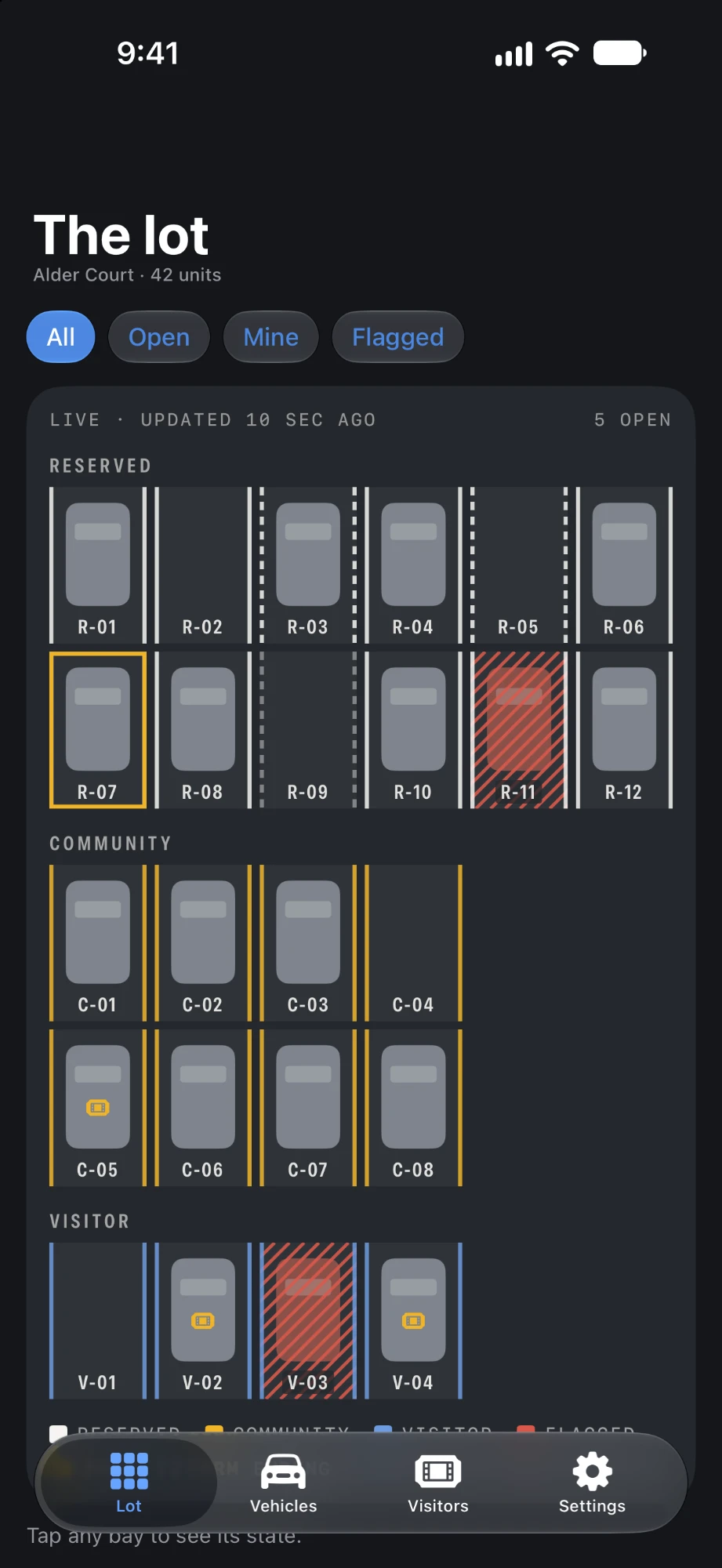
A parking area in Lotwell: 24 reserved stalls in two rows, open and taken bays, one flagged stall, and the terms ending or lapsed.
THIS IS MY SPOT.
Guests park on the street. Not here.
Third time this month. Next time I call the tow truck.

Everyone has a parking story.

The second car that lives in the guest spot. The visitor who circled for twenty minutes and gave up. The note on the windshield, and the knock on the door a week later. The treasurer with the spreadsheet, who never asked for the job of knowing what everyone drives.

Most lots run on a list. Who lives where. What they drive. When they have guests. When they are away. It starts as a spreadsheet. It ends up in an inbox, a group chat, and a binder at the gate. It outlasts the board that made it. It gets forwarded.

When neighbors fall out, the list tells them exactly who to be angry at.

None of it is needed to decide whether a car may park in a stall.

So we got rid of the list.
A verdict. Not a list.

Whoever checks a stall gets an answer. Allowed or not, and why. The association still keeps its rules. It just stops needing to know who everyone is to do it.

  1. 01

    Scan the stall.

    Every stall has a placard with its number and a code. The code is a random token. To anyone outside the community, it says nothing.

  2. 02

    Scan the car.

    The tag, or the plate. The camera can read a plate right on the phone. No photo is saved. Nothing is uploaded.

  3. 03

    Get the answer.

    Belongs, pass, or needs a look, and why. Not whose car it is. Not which unit. Not how to reach them.

What a check returns. Three answers, posted like the signs in the lot.

Belongs Registered. Right stall.

The car is on the register and in a stall it may use. Nothing else is shown.

Pass Until 9:30 PM

A resident issued this guest a visitor pass for this stall. Not which resident.

Needs a look Wrong stall

The car is registered, but this is not a stall it may use. A note can be filed. The right household is paged.

One lot. Four views.

Each role sees what the job needs. Nothing more.

Owner
Your unit. Nothing else. Your vehicles and tags. Your stall and its term. Your visitor passes. Notes on your stall. The lot, as open or taken.
Renter
Lives there. Parks there. Their own vehicles and visitor passes, with a code from the owner. The owner's decisions stay the owner's.
Front gate
Verdicts in. Notes out. Check a stall. Get an answer. File a note. No units, names, or contact details. Ever.
Board
The property, in units and stalls. Rules, layout, the unit register, patrols, and the audit log. Vehicles as a count. No names. No plates.
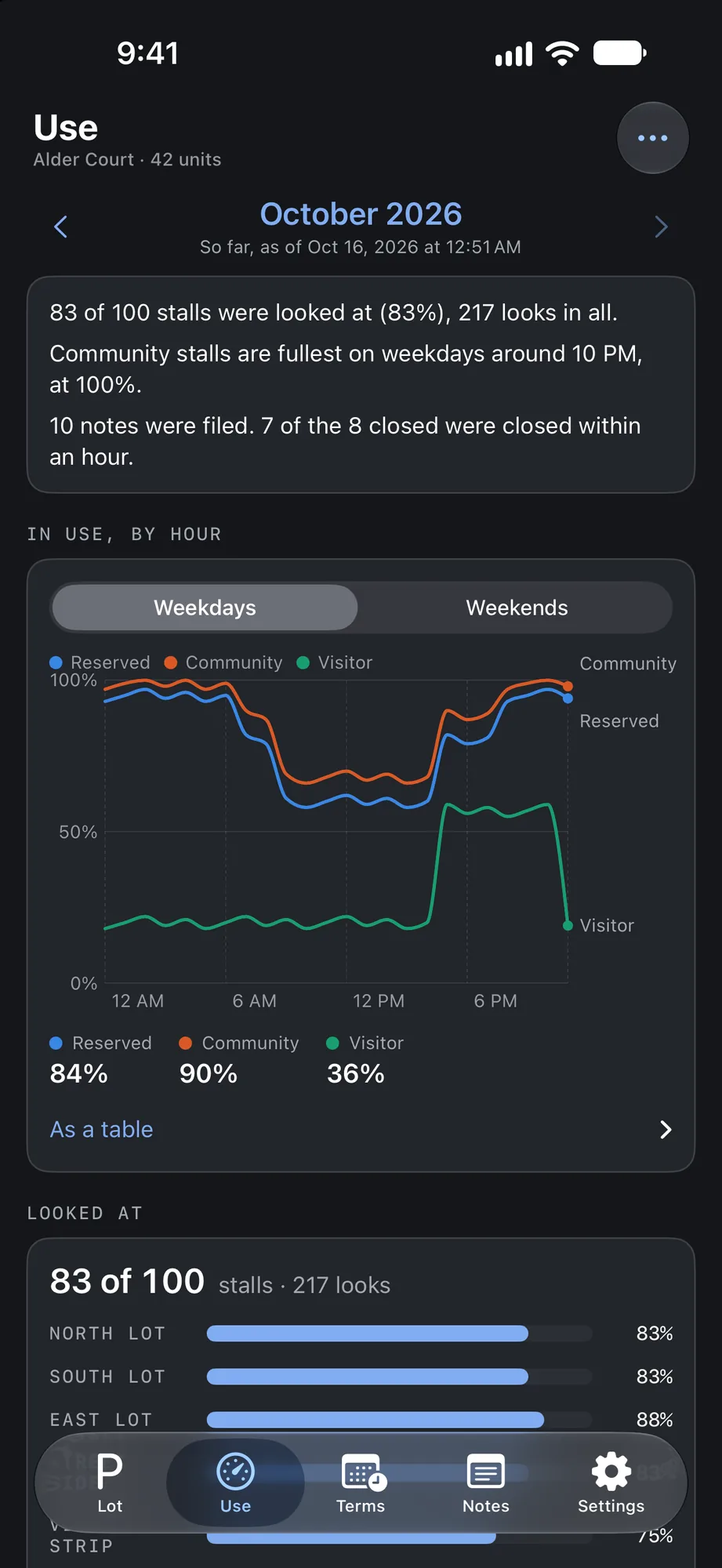
The board's month: how many stalls were looked at, when community stalls are fullest, notes filed, and a chart of reserved, community, and visitor stalls in use by hour on weekdays.

For the board

Run the lot from a phone.

Your rules, written in once. Applied the same way to everyone. A record of every decision.

Your rules. Every time.

Tags per unit. Where a reserved tag is valid. Visitor nights a month. How long a pass can run. Every change is a new numbered version. A note filed last month keeps the rules of that day.

The second-car loophole. Closed.

Tagged car in community parking. Untagged car in the reserved stall. A reserved tag can be limited to its own stall, and cars are counted per unit against its tags. Either scan order catches it.

A patrol takes minutes.

Walk the lot. Tap each bay. Scan a tag or type a plate. Finish, and the totals are written to the audit log. Several board members can walk the same round.

Reads plates with the camera.

Every plate in view is marked in place, on the phone. No picture is saved or sent. A registered car checks its own stall as you walk past.

Fair, before a tow.

A flagged car gets a note, and the household that holds the stall is paged. Nobody is handed a phone number. Past the grace period, one board member can send your tow company the stall, the plate, and a deadline. The household can answer once. Any board member can call it off.

Snow day? Paving? Sweeping?

A move-your-car event picks the stalls, sends reminders and a page at the start, and keeps count of who has said their car is out.

Starts from your spreadsheet.

Units, bedroom counts, and stall assignments load straight from it. You see every change before anything is saved.

A record nobody can rewrite.

Rule changes, reassignments, layout edits, patrol totals. All logged. Nothing edited. Nothing deleted. The log names units and stalls. Never people.

The month, on one page.

How full each kind of stall is, hour by hour. Which stalls nobody checked. Notes filed and how fast they closed. A one-page PDF for the board meeting. Counts only.

Every property, side by side.

A property manager sees each community's month next to the others, in the web console. Use, patrols, notes, and tows. No names.

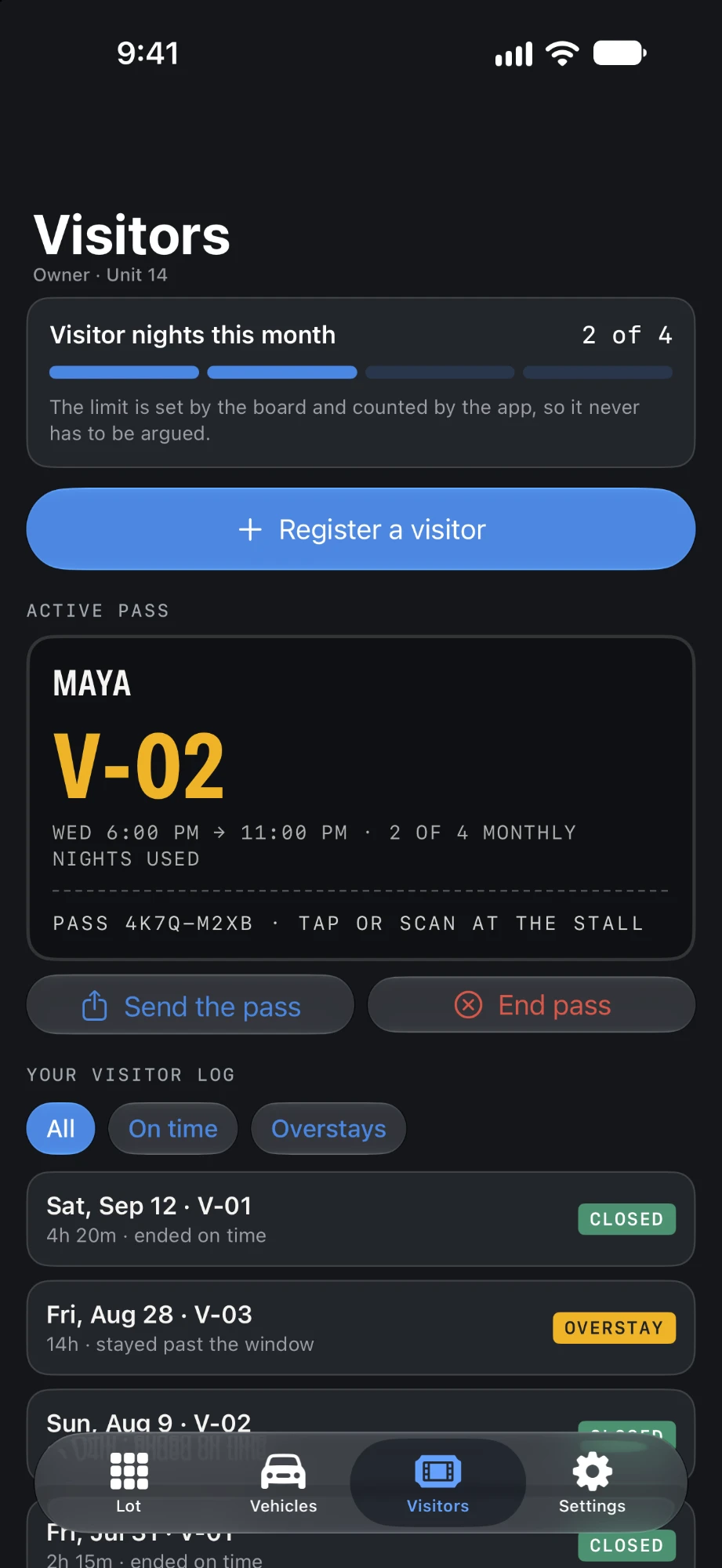
The owner's Visitors screen: visitor nights used this month, an active pass for stall V-02, the guest asking for more time, and the visitor log.

For owners

Your parking. Your business.

Control over your own stall. Without handing the association a file on your household.

Register your own cars.

Each one takes one of your unit's tags. The plate is encrypted when it is saved. You can read it back. Your neighbors, the gate, and the board cannot.

A guest pass in a few taps.

Enter the plate and how long they are staying. The guest gets a link. No app, no account. The stall in big letters, directions, a countdown, and a code the gate scans. When the pass closes, the plate is deleted.

You hear first. Not the tow truck.

A note on your stall pages your phone. One tap tells the gate you are handling it. If a tow is ever requested, you are paged first and can say you moved the car or that it is a mistake. Nothing goes ahead until the board looks. Nobody was given your number.

See the lot before you drive in.

Every area shows how many stalls are open. The rest show as open, taken, on a pass, or flagged. Never whose.

Away? Lend the stall.

Release it to the community for a date range. Or lend it to one neighbor with a one-time code. Neither of you is told the other's unit.

On the Lock Screen when it matters.

A pass, a move-your-car event, or a car at a charger shows on the Lock Screen while it is live. A Next Up widget. Ask your phone's assistant for a visitor pass.

Lights on? Tell the owner.

Anyone can scan a car's tag with any phone and send one of six fixed messages. The owner sees it in the app. Neither side learns who the other is.

No password to lose.

Sign in with an emailed link, with Sign in with Apple, or with Google. Lotwell keeps nothing from Apple or Google but the sign-in itself. Not your name. Not your contacts.

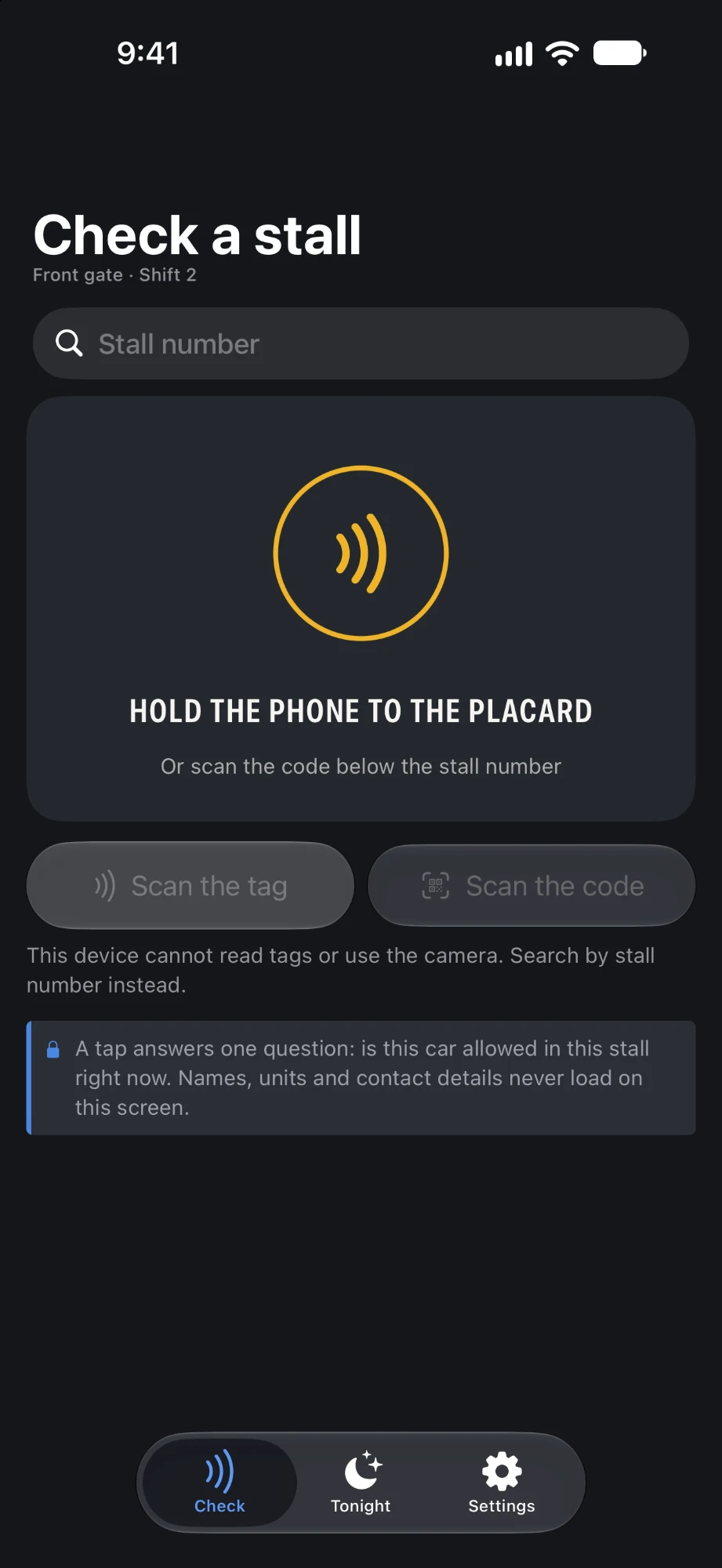
The gate's Check a stall screen: a verdict of No pass on file for stall V-03, and what is parked there, checked by tag or plate.

For the gate

An answer. Not a binder.

And a way to act on it.

  • Scan the placard, then the tag or the plate. Get a verdict, with the reason.
  • See which visitor passes are valid right now, and where each guest should be parked.
  • File a note on a car that should not be there. The household is paged. The grace period starts.
  • Never look someone up. Never call someone. Never judge whose car it is. The gate cannot see a unit, a name, or a number. So nobody can pressure it into sharing one.
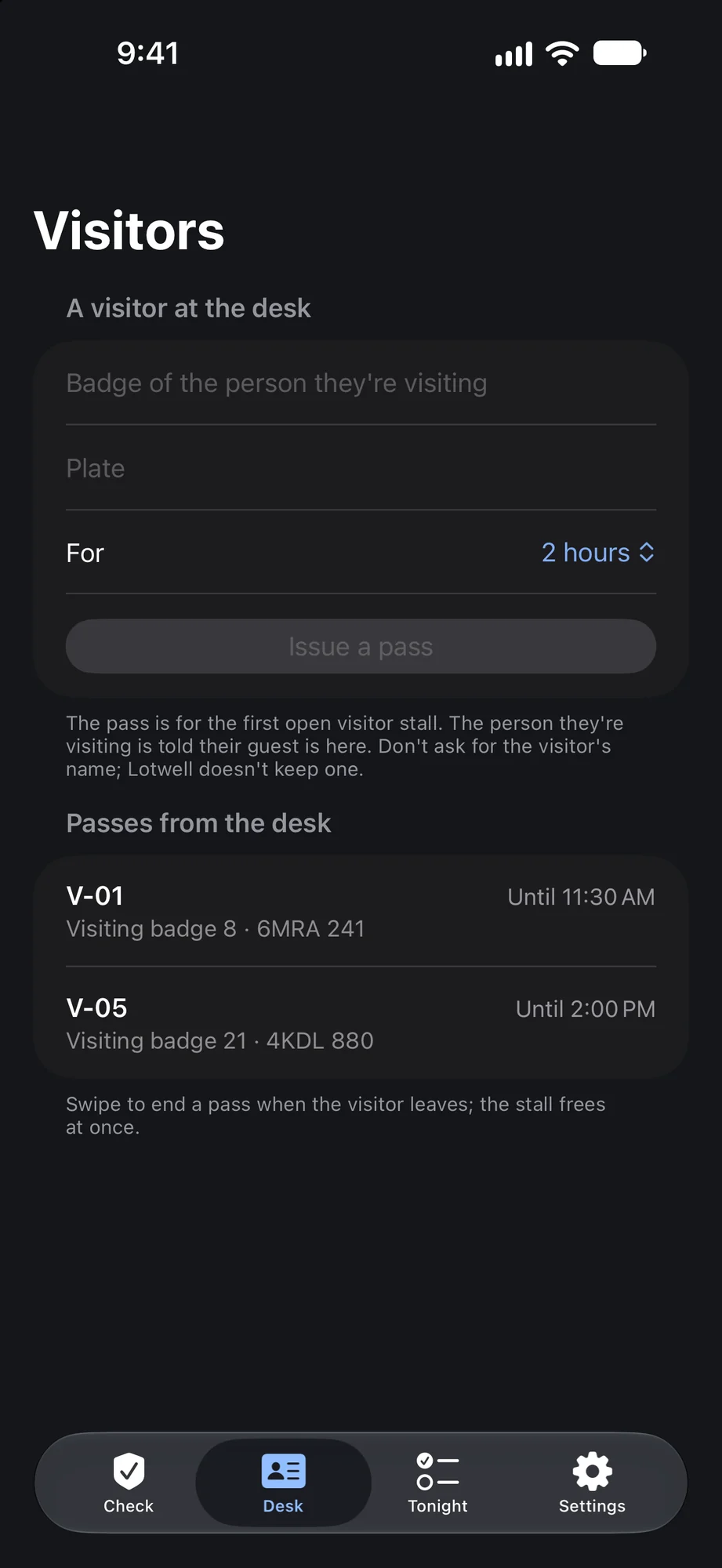
The front desk at a workplace: a form for the badge of the person a visitor is seeing and the visitor's plate, and two visitor passes, V-01 visiting badge 8 until 11:30 AM and V-05 visiting badge 21 until 2:00 PM.

For workplaces and campuses

Badges, not names.

The same yes or no, for an employer's lot or a college's. The app speaks your place's words: badges, staff, and the front desk at work. Permits and the parking office on campus.

Shifts, not just tags.

A permit has days and hours. Weekdays seven to four. Nights past midnight. Outside them, the car reads as not allowed.

One lot per permit.

On a campus, a permit can be good in one lot only. Every permit can end on the last day of the semester, all at once.

Book tomorrow's stall.

Some stalls are booked a day at a time, like a desk. Booked, the stall is yours until midnight. Not booked, it is anyone's, first come. You set how far ahead and how many a week.

Carpools park closer.

Two to four people pair up with a one-time code. Their cars may use the carpool stalls. Nobody sees who is in a carpool. Not even its members.

A visitor at the front desk.

The desk types the host's badge and the plate. The visitor gets the first open stall. The host is told their guest is here. No visitor name is asked for.

A number. Never a person.

Each person is a badge or permit number. Facilities sees which number booked a stall. Nobody else sees even that. The same privacy as everywhere else in Lotwell.

The rule

A check needs a yes or a no.
It does not need a name.

We hold every feature to one rule. Everyone can tell whether a car belongs. Nobody learns who anyone is. This is what follows from it.

Verdicts, not names.

A check returns belongs, pass, or needs a look, and the reason. Never a unit. Never a person.

No resident directory.

No names. No phone numbers. No mailing addresses. Lotwell does not collect them, so there is nothing to leak or misuse.

Codes, not searches.

People join, borrow a stall, or get a tag with a one-time code. Nobody searches for a neighbor.

Pages, not phone numbers.

To reach a resident, you file a note. The app delivers it. You never learn who received it.

Counts, not lists.

The board sees how many vehicles a unit has registered. Not which ones.

The unit stays off the patrol screen.

A board can choose to see which unit holds a stall on patrol. It is off by default, and every use is written to the audit log.

The camera reads. A person decides.

A camera read never flags a car by itself. A misread cannot become an accusation.

Guests are forgotten.

A visitor's plate is deleted when the pass closes.

Who can see what.

The table the product is built to. "Own" means your own unit only.

Information Owner Renter Front gate Board
Whether a stall is open, taken, on a pass, or flagged Yes Yes Yes Yes
Which unit holds which stall Own Own No YesThe board assigns stalls, so it sees the register.
A unit's vehicles and license plates OwnIncluding a renter's, if the unit is rented out. OwnOnly the vehicles they registered. NoTypes or scans one and gets a verdict. NoA count per unit. Can enter a plate, cannot read one back.
Names, phone numbers, addresses Not collected Not collected Not collected Not collected
A visitor's plate Own guests Own guests While the pass is openThe plate and its stall, not who invited them. While the pass is openBy checking the plate.
Notes filed on a stall Own OwnSince their lease began. YesBy stall, with no unit. YesBy stall. Showing the unit on patrol is off by default and audited.
Who lent a stall to whom NoEach side sees the stall and the dates only. No No Yes
The audit log No No No YesUnits and stalls, never people.

The server keeps the rules. Not the screen.

Privacy here is not a matter of what the app chooses to display. Every request is checked. Each role gets back only what it may have.

Checked on every request.

A removed staff member. A sold unit. An ended lease. Each stops working immediately, not whenever a session happens to expire.

Plates are never stored as written.

A keyed hash, so a plate read at the gate can be matched. An encrypted copy, so its owner can read it. The keys live apart from the data.

No passwords.

An emailed link, Sign in with Apple, or Google. Nothing to reuse, guess, or leak.

Codes work once.

Then they expire. Only a hash is stored. Repeated wrong guesses are cut off.

Records only grow.

Notes and audit entries have no edit and no delete. Any decision can be followed back to who made it, and under which version of the rules.

Deletion that means it.

Anyone can delete their account from inside the app. What the property keeps on record names nobody.

What we do not claim.

A privacy promise is only worth something if it says where it stops. Ours stops here.

  • Plate encryption is not end-to-end. Plates are encrypted at rest with keys Lotwell holds, so the service can show an owner their own plate. Someone with the data alone cannot read them. Lotwell, as the operator, technically could.
  • Lotwell can administer a property. To set a community up or fix a problem, Lotwell's operator can act as a board member of that property. Changes made that way are written to the property's audit log like any other.
  • The board sees which unit holds which stall. It assigns them, so it has to. What it does not get is who lives there or what they drive.
  • An owner who rents out their unit can see their renter's vehicles. The owner remains answerable to the association for the unit.
  • A tow company sees a plate. When the board sends a tow request, the company gets a page with the stall, the plate a board member read off the car, and the deadline. It never shows a name or a unit, and it stops working when the request closes.
  • An email address is used to sign in unless the person chooses Sign in with Apple or Google. It is used for sign-in only and is not shown to anyone in the community.
  • iPhone, iPad, and Android. iOS 26 and later on Apple devices. The same features and the same privacy rules on both.
The board pays. Residents never pay.

Pricing

Per unit, per month.

Paid on the web by card. At a workplace or on a campus, a unit is one person. The app sells nothing, and residents are never asked for anything.

  • Every role on one property: owners, renters, the gate, the board, and guests.
  • Placards with QR codes, printed from the web console in an afternoon.
  • Setup: we create the property and hand the board a code.

Tell us how many units you have and we will send the figure the same day.

Ask for a quote

From spreadsheet to running lot.

An afternoon, most of it spent posting placards.

  1. 01

    We create your property.

    Lotwell sets up the community and hands the board a one-time code. The first board member signs in and enters it.

  2. 02

    You load the lot.

    Import units and stalls from your spreadsheet. Place the property on the map. Sort stalls into areas.

  3. 03

    You set the rules.

    Tags per unit. Visitor nights. Pass length. Tow grace. Who may lend a stall. The defaults work as they are.

  4. 04

    You bring people in.

    A code for each unit, the gate, and the rest of the board. Post the placards. Owners register their own vehicles.

Get started

Retire the list.

We are setting up our first properties now. Leave your email and we will tell you when it is ready for your property.

Prefer email? Write to support@lotwell.app with your unit count.